
FedEx EMEA: Account Configuration
For general information about how to configure a carrier in Carrier Connect, refer to our User Guide (German version).
To create a new FedEx (EMEA) account in Carrier Connect, open FedEx in Master data > Carrier configurations. In the tab Accounts click on New.
Select account type FEDEX_RESTWS.
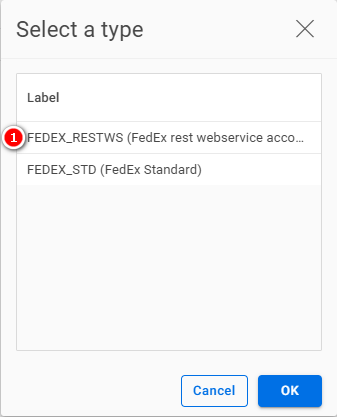
If you want to create a new account, choose No:

FedEx account
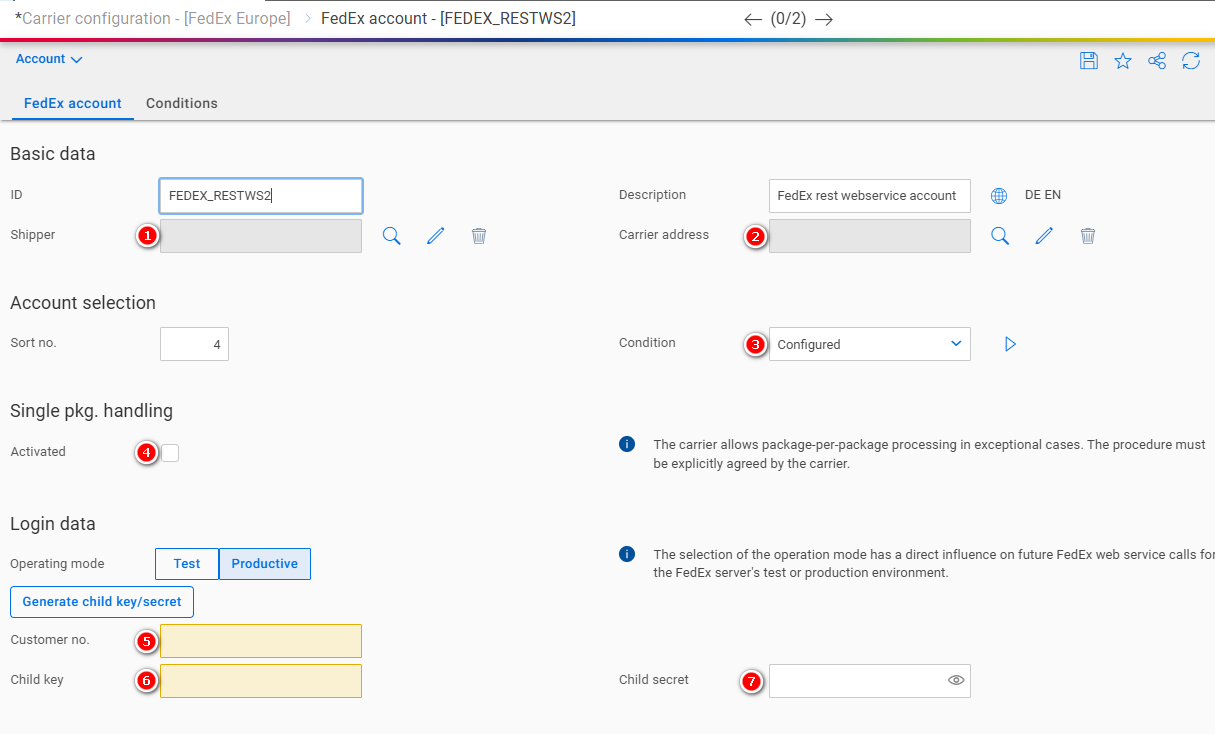
| Number | Field | Comment |
|---|---|---|
| 1 | Shipper | The address of the shipper |
| 2 | Carrier address | The address of the carrier (depot) |
| 3 | Condition | See our user guide |
| 4 | Single pkg. handling | See Single Package Handling |
| 5 | Customer number | Assigned by the carrier |
| 6 | Child key | Assigned by the carrier |
| 7 | Child secret | Assigned by the carrier |
Single Package Handling

- The package number and the total number of packages are usually printed on the package label, e.g. 1 OF 2 for the first package, 2 OF 2 for the second package. Exception is the UPS service "Standard Package". With this service, 1 OF 1 is always printed on each package label, regardless of how many packages there are in total.
- If single package handling is activated, 1 OF , 2 OF , etc. will be printed on the label for all services except "UPS Standard Package".
Updated 10 months ago
Did this page help you?